
I had problems using a smartphone for audio playback, either the app for playing back music or podcasts would suck or my audio jack would stop working, or the dongle to the iphone would stop working. On top of that it would help drain the battery on my phone, not too much but enough to be noticable. So I decided to go back to using dedicated mp3 players, but first some history:
my first foray into mp3 players was back in the 2000's, my first mp3 player had enough built in storage to fit 12 or so mp3 files. Seems archaic but this was great back then, no need to carry around a CD player and deal with CD skipping! After awhile I had a couple cheap creative mp3 players, the storage size kept growing so I could have a bunch of music on the go, but these things had clunky UIs and eventually stopped working. The last mp3 player I had before the smartphone era was an iPod, not sure which generation but I believe it had 100 some GB of storage? Fantastic device but I was a windows user and the iTunes software for windows was TERRIBLE. On top of that the iPod would want to sync to iTunes instead of just letting me drag and drop files. While the iPod had much better hardware and UI than the cheap Creative players it still had its caveats.
these are the mp3 players I have today:
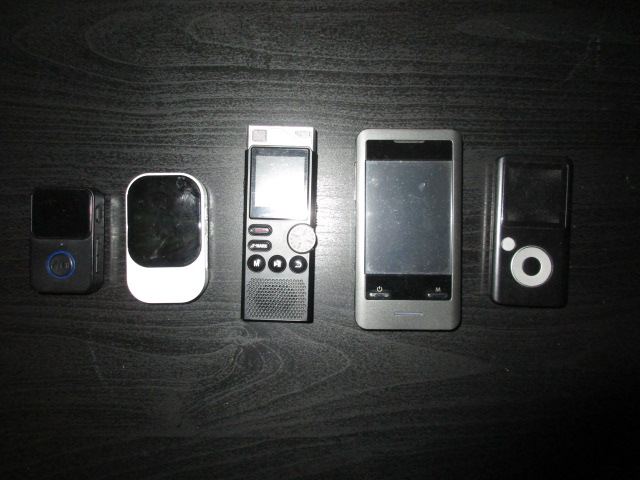
I started looking up mp3 players on eBay and there are all sorts of non-branded options, they are all cheap ($20-$30) and are surprisingly good
The leftmost player I use for podcasts, I use a script to break podcasts up into 5 minute segments (I'll post that below) and it plays all the tracks in each folder from first to last. Navigating means that you need to skip each track over and over to get to the folder, but I don't end up doing that often I just let it play. I use this player at work so its nice to have a big play/pause button. I don't have to pull out the device to pause playback I can just click the button in my pocket if someone needs to talk to me.
Second from the left is an unbranded device, I found it by looking up mp3 player camera, yes this thing can take pictures and video. I bought this mainly for mp3 playback though, this device is better for loading lots of folders of music. it has an android-style touch UI that allows for easy navigation. Be gentle with this thing I dropped it and the screen got damaged, I can still read the filenames thank gosh. Kind of a janky device but it does the job.
In the middle I have WUCOTC Z1 digital voice recorder, for this one I was just curious to see what type of cheap audio recorders were on ebay. This one is interesting! It has built in 8GB with expandable micro sd storage. I can plug this thing is and use it as a micro sd card reader as well which is nice. A big red button on the front allows for easy recording right when you turn the device on, although the quality is not great. It has playback functionality though so this can be used for an mp3 player (i think WAVs too?) the biggest problem is that the headphone jack is on the side of the device which makes having it in your pocket kind of annoying. This device is cool but it doesn't get a lot of use...
I have two Coby devices on the right hand side, the MP828-8G and the MP600-2G. I found the MP600-2G at a Goodwill complete in the orignal package and I was very curious to see how it held up. Not well. The UI is slow and clunky, and it hates long audio files. For simply playing back regular song length mp3s it works fine. I found the MP828-8G on eBay while looking for mp3 players that also had a camera. This was an early touch screen devices and man it sucks. The UI is clunky and the touch screen feels terrible, I feel like it works best using a finger nail rather than your actual finger. Pictures and video are not great but sometimes you can get a picture that has a certain low fidelity charm to it, but mostly it looks awful.
I should mention that the white unbranded player and the two Coby devices have radio functionality, and I was shocked at how good they pick up radio signal. So while the Coby UI is awful they work pretty well as portable radios.
BONUS: my script for chopping up podcasts into 5 minute segments:
#!/bin/bash
find kasts -name '*.mp3' -exec mv {} pod_temp/ \;
cd pod_temp
dir=/path/to/pod_temp/
for f in "$dir"*; do
mkdir -p "$f""_dir"
mv "$f" "$f""_dir"
done
for d in ~/pod_temp/*;
do (cd "$d" && ffmpeg -i *.mp3 -c copy -f segment -segment_time 300 %03d.mp3);
cd "$d" && rm ????????*;
done
The kasts folder is where I pointed my podcast catcher to download podcasts. change /path/to/pod_temp to wherever you want the files to be stored, then mount a micro sd card and mv pod_temp/* to the mount location.